
Spam Filtering
Interpole SpamCan gives you the power to monitor and filter e-mail traffic to protect your organisation from virus attacks, spam mails and wasted bandwidth right at the Internet level. SpamCan provides for virus-free and spam-free mail.
All the unwanted emails (containing spam and virus) are filtered on our Internet server before they reach your mail server and the intended recipients.

- Triple-level Virus Scanning
- Multi-layered Anti-Spam capabilities stops 90-95% of Spam
- Spam Analysis Engine with auto-updates and auto-learning
- Personal Whitelists and Blacklists allow/block emails from specific IDs/domains
- Real-time Blackhole Lists capture data from global spam servers to block spam
- Content filtering
- Reports on email trends, viruses detected, spam volumes, policy violations
10 Emails
Spam + Virus Filtering
₹ 3500/ per year
- Spam Free Experience
25 Emails
₹ 7590/ per year
- Spam Free Experience
50 Emails
₹ 13090/ per year
- Spam Free Experience
75 Emails
₹ 18590/ per year
- Spam Free Experience
100 Emails
₹ 21890/ per year
- Spam Free Experience
How Spamcan works
Email spam and virus are major problems, hence there is a great challenge to eliminate these twin threats. SpamCan provides you with excellent spam and virus filtering from an enterprise approach.
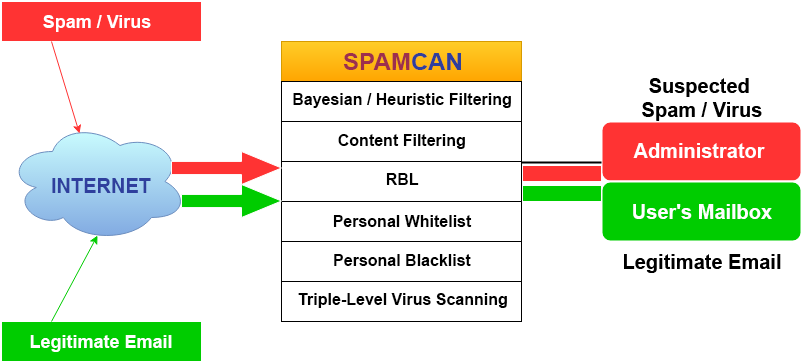
Email is examined thoroughly at the Internet level before sending it to your email server, hence minimising the impact of spam and viruses on the end user.
Spamcan Features explained
- Completely different set of actions can be applied to spam scoring above a “High Score” threshold value.
- Spam can be tagged, rejected, discarded, archived or forwarded to other addresses for inspection by administrators
- Major legitimate newsletters and mailing lists
- Legitimate companies in countries that are otherwise blocked
- You can also create a personal “blacklist” to block email from certain sources. It does not need be Spam; it can be used to block someone who is harassing your employees. Or you might want to block recruiters who are trying to steal your employees.
- You can blacklist by IP address, email address and/or content. For example, if junk@baddomain.com is harassing you, all emails from him can be completely blocked. Such blocked emails can be re-routed to your “Spam” mailbox or completely blocked
- Several organizations and companies are constantly identifying the mail servers, which are actively sending Spam. They create “real-time blacklists” (RBL) of the IP addresses of these mail servers, which are updated daily, even hourly. We have chosen four of the better known RBLs for selection within the SpamCan service. (By default, all are selected.) Our main criteria was to choose RBLs which are least likely to block legitimate email.
- A good blacklist not only quickly adds a new Spam source, but also removes it when it is no longer sending Spam. Spam is often sent through “open relays”, which are legitimate mail servers, which have been (trivially) “hacked” by spammers. Typically, the owner of the mail server learns of this within a day and then fixes the problem. Therefore, mail systems should not be blacklisted any longer than necessary.
- Allows/denies attachments based on filename, providing implementation of any email security policy. Easily used to block attachments which are common ways of disguising viruses, e.g. ReadMe.doc.exe These can be varied for different users
- HTML-based Attacks
- Scans for common signs of attack such as “IFrame” and “Object Codebase=…” HTML tags. Both have been used many times to exploit vulnerabilities in Outlook (& Express) and Internet Explorer
- Dangerous HTML content can be stripped. Checks and traps added for all known Outlook, Outlook Express, Internet Explorer and Eudora security vulnerabilities.
FAQ About Spam Filtering
Typically, within a business day. The primary reason for the delay is that any change to your domain’s “MX” records do not take effect immediately, but must propagate through the Internet. Technically, your MX records have a “TTL” (Time-To-Live) value which specifies how quickly changes will take effect. A typical TTL value is one hour, but your domain may be configured with another value, such as 24 hours.
That is no problem. We will email you the necessary changes and you can simply forward this email to your hosting company or IT department.
SpamCan does not affect your email security in any way. Our service does not backup or make copies of your email messages. The log files only contain the email addresses of the sender and the recipient. We will never log the entire email message. We do not share any information with anyone else! In the event your mail server is off-line, our service will “spool” your email messages. When your mail server is back on-line, it will automatically transfer all the spooled email messages. Even in this case, the temporarily spooled messages will not be permanently saved or backed up
Hardly! This service may delay your email by a few seconds, but not more than a minute. Email with large attachments, especially if you have anti-virus service, can be delayed up to about a minute or so because of the time it takes to do the scanning for viruses and spam.
Spamcan allows end users to completely manage their custom filtering rules. We also provide a domain administrator account through which you may also set the rules on behalf of your domain users.
Every email address that is active on the domain is counted as a user. If your mail server accepts mail for an incoming address, that user is considered to be active. It does not differentiate between real accounts, aliases or forwarders.
Spamcan prevents delivery of spam and viruses to your mailbox. In case of desktop antivirus, the harmful mails are first downloaded to your PC and then quarantined. This increases the risk for you, as well as wasting your time and bandwidth in downloading the junk.